Self-Driving Simulation
Self-Driving Simulation
Level: 9/10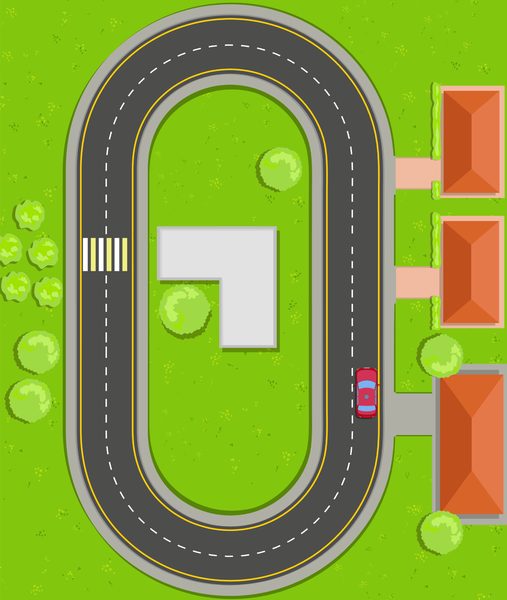
- Download and install UDUSimp and sign in with your account.
- Choose a workspace folder; the libraries and start code are downloaded into its
c_…/py_…folders. - Start the simulation, then write and run your code in the workspace.
Function List
| Function | Description |
|---|---|
sim_connect() |
Connect to Simulation |
sim_disconnect() |
Disconnect from Simulation |
drive(int direction) |
Drive the Car |
steer(int angle) |
Steering Control |
int d = lidar_read(int angle) |
Read Lidar Sensor |
int v = drive_read() |
Read Drive State |
int s = steer_read() |
Read Steering Angle |
int c = collision_read() |
Read Collision Sensor |
Purpose of the Simulation
Introductory programming education in languages such as C, C++, and Python is generally taught through console applications. As a result, the output of developed code is displayed only on the console. This prevents students from visualizing the program flow and fully understanding its behavior.
The purpose of this simulation is to provide an environment where students can see how their code actually works. To increase realism, lidar sensors, drive motor, steering, and collision sensor can each be controlled independently, and the output value of each sensor can be read.
After downloading and installing the UDUSimp program, you can run any simulation and start developing code using your preferred editor. Recommended editor: Visual Studio Code.
The difficulty level of the autonomous driving simulation is rated 9 out of 10.
General
1 – Features
- Forward / Backward / Stop drive motor
- Angle-based steering control (-60° / +60°)
- 360° Lidar distance sensor *
- Collision sensor *
- Drive state indicator *
- Steering angle indicator *
2 – Task and Definition
Examine autonomous vehicles used in daily life and their operating logic. Develop the code required for the car to avoid obstacles, follow the track, and reach its target using sensor data.
Example scenarios:
1- Stop the car when an obstacle in front comes closer than 50 units
2- Turn right if there is space on the right side, otherwise turn left
3- On collision, stop the motor and notify the operator
must be implemented.
Note: Lidar data is refreshed on every simulation step (about 30 ms); build your decision logic by re-reading values on each loop. Making movement decisions from a single reading may lead to incorrect results.
Connect to Simulation
sim_connect()Establishes connection between the simulation and your code.
#include "otonom.h"
int main() {
    sim_connect();
    return 0;
}
from otonom import *

sim_connect()
Disconnect from Simulation
sim_disconnect()Terminates the connection between the simulation and your code.
#include "otonom.h"
int main() {
    sim_connect();
    sim_disconnect();
    return 0;
}
from otonom import *

sim_connect()
sim_disconnect()
Drive the Car
drive(int direction)Runs the car motor.
1st param:
DRIVE_FORWARD (1) = Forward
DRIVE_BACKWARD (-1) = Backward
DRIVE_STOP (0) = Stop
Example:
drive(DRIVE_FORWARD) → car moves forward
drive(DRIVE_BACKWARD) → car moves backward
drive(DRIVE_STOP) → car stops
#include "otonom.h"
int main() {
    sim_connect();
    drive(DRIVE_FORWARD);  // ileri
    drive(DRIVE_BACKWARD); // geri
    drive(DRIVE_STOP);     // dur
    return 0;
}
from otonom import *

sim_connect()
drive(DRIVE_FORWARD)   # ileri
drive(DRIVE_BACKWARD)  # geri
drive(DRIVE_STOP)      # dur
Steering Control
steer(int angle)Turns the car's steering to the requested angle.
1st param: angle in degrees
0 = go straight
+x = turn left (e.g. 48 = 48° left)
-x = turn right (e.g. -30 = 30° right)
Example:
steer(0) → straight
steer(48) → 48° left
steer(-30) → 30° right
The angle is limited to -60…+60 (larger values are treated as 60).
#include "otonom.h"
int main() {
    sim_connect();
    steer(0);    // duz
    steer(48);   // sola
    steer(-30);  // saga
    return 0;
}
from otonom import *

sim_connect()
steer(0)    # duz
steer(48)   # sola
steer(-30)  # saga
Read Lidar Sensor
int d = lidar_read(int angle)Reads the distance measured by the lidar beam at the given angle.
1st param: angle (0-360 degrees, relative to the car, counter-clockwise)
0 = right of the car
90 = front of the car
180 = left of the car
270 = rear of the car
Resolution is 2 degrees (an odd angle reads the previous even angle).
Returns: distance 1-100, 0 = nothing detected in range
Example:
lidar_read(90) → distance of the obstacle in front
lidar_read(0) → distance of the obstacle on the right
lidar_read(180) → distance of the obstacle on the left
#include "otonom.h"
int main() {
    sim_connect();
    int d = lidar_read(90);  // on
    if(d > 0 && d < 50)      // 0 = engel yok
        drive(DRIVE_STOP);   // engel yakin, dur
    return 0;
}
from otonom import *

sim_connect()
d = lidar_read(90)  # on
if 0 < d < 50:      # 0 = engel yok
    drive(DRIVE_STOP)  # engel yakin, dur
Read Drive State
int v = drive_read()Reads the car's current drive state.
Returns:
0 → car is stopped
1 → moving forward
-1 → moving backward
#include "otonom.h"
int main() {
    sim_connect();
    int v = drive_read();
    if(v == 1)
        printf("Arac ileri gidiyor");
    return 0;
}
from otonom import *

sim_connect()
v = drive_read()
if v == 1:
    print("Arac ileri gidiyor")
Read Steering Angle
int s = steer_read()Reads the current steering angle (degrees).
Returns:
0 → straight
+x → turned left (e.g. 48 = 48° left)
-x → turned right (e.g. -30 = 30° right)
#include "otonom.h"
int main() {
    sim_connect();
    int s = steer_read();
    if(s > 0)
        printf("Direksiyon sola donuk");
    return 0;
}
from otonom import *

sim_connect()
s = steer_read()
if s > 0:
    print("Direksiyon sola donuk")
Read Collision Sensor
int c = collision_read()Reads whether the car has crashed.
Returns 1 → car crashed
Returns 0 → no collision
#include "otonom.h"
int main() {
    sim_connect();
    int c = collision_read();
    if(c == 1) {
        drive(DRIVE_STOP);
        printf("Carpisma! Dur.");
    }
    return 0;
}
from otonom import *

sim_connect()
c = collision_read()
if c == 1:
    drive(DRIVE_STOP)
    print("Carpisma! Dur.")